Invoices & e‑Invoice
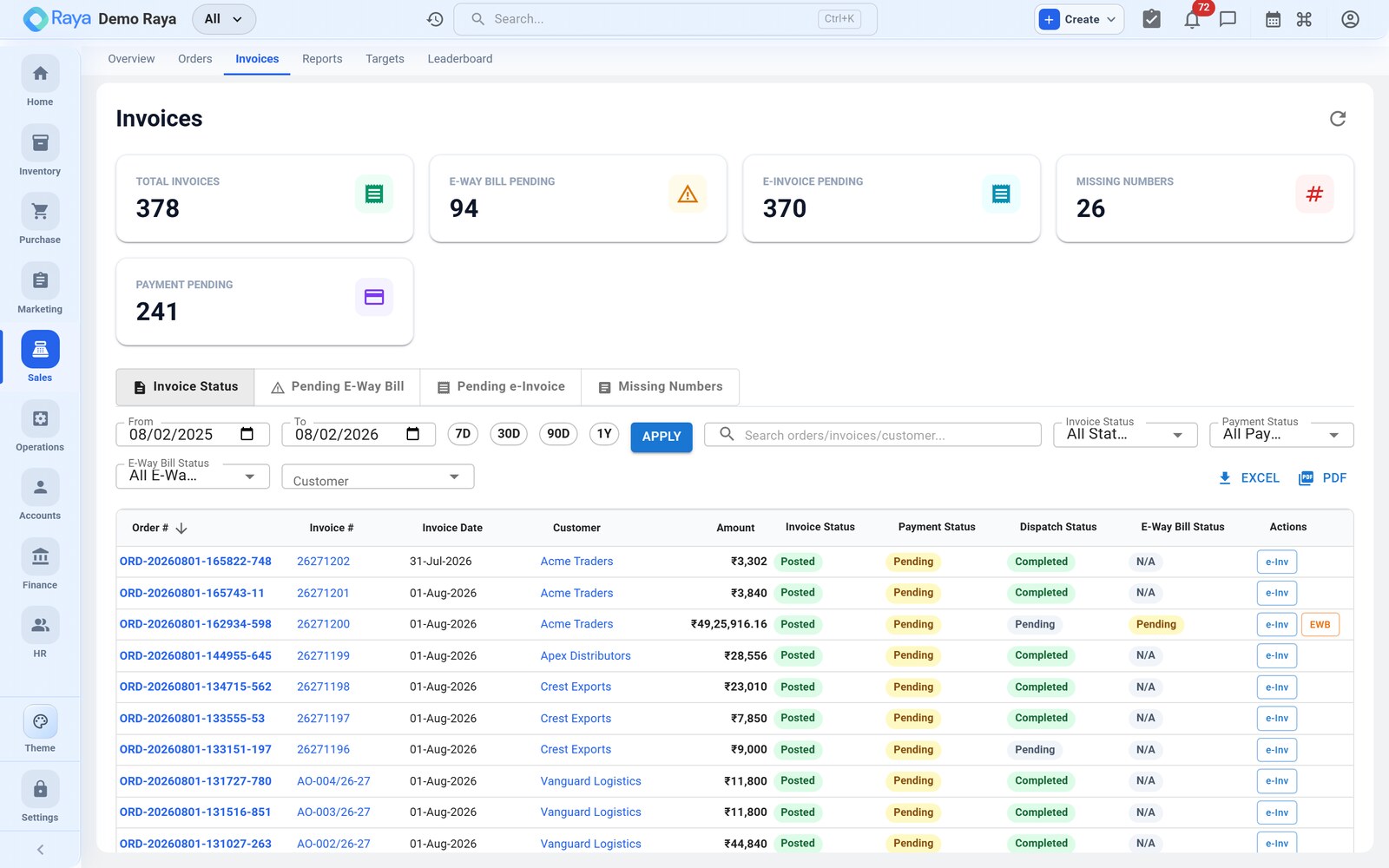
Turn a sales order into a GST tax invoice, add the India e-Invoice IRN, signed QR and e-Way Bill in one action, share it with the customer, and let Finance post the Sales and COGS vouchers on completion. This page invoices SO-1043 for Sunrise Polymers all the way to a recorded NEFT receipt.
What we are invoicing
SO-1043 carried two lines totalling ₹4,82,000 + IGST 18% ₹86,760 = ₹5,68,760. The order is Shipped, so it is ready to bill:
| Product | HSN | Qty | Rate (₹) | Taxable (₹) | IGST 18% (₹) |
|---|---|---|---|---|---|
| HDPE Granules | 3901 | 12 MT | 27,000 | 3,24,000 | 58,320 |
| LDPE Film | 3920 | 4 MT | 39,500 | 1,58,000 | 28,440 |
| Total | 4,82,000 | 86,760 |
Generate the invoice
Once the order is Shipped (or any status you choose):
- Open SO-1043 → Invoice tab → Generate Invoice.
- Pick an invoice template (see below).
- Choose the number series — automatic (next in sequence, e.g.
INV-2045) or manual. - Confirm the invoice date and place of supply — Raya pre-fills the place of supply from Sunrise Polymers' state (Maharashtra), which is why the tax shows as IGST, not CGST/SGST.
- Click Generate. Raya produces the invoice PDF as INV-2045 and links it to the order.
Invoice templates
| Template | Best for |
|---|---|
| GST-compliant | Indian businesses — full HSN/SAC, CGST/SGST/IGST split, signature block. Use this for SO-1043. |
| Modern | A clean, branded look for simpler or international bills. |
| Classic | Traditional layout with logo and watermark. |
Customise any template in Settings → Invoice Settings — add your logo, terms and conditions, and bank details (so the customer knows where to NEFT the ₹5,68,760).
e-Invoice (IRN), QR & e-Way Bill — one action
For businesses above the e-Invoicing turnover threshold, raise all three statutory documents together instead of one at a time:
- One-time setup: enter your NIC e-Invoice credentials in Settings → Tax & Compliance (per GSTIN).
- On INV-2045, click Generate IRN. Raya builds the invoice JSON and sends it
to the NIC IRP, which returns:
- the IRN — the 64-character Invoice Reference Number,
- the acknowledgement number and date, and
- the signed QR code.
- The e-Way Bill Part-A is raised from the same action (the goods move inter-state and exceed the ₹50,000 threshold). Add Part-B — vehicle number and transporter — when the truck is assigned.
- The IRN, QR and e-Way Bill number are stamped onto the printed invoice automatically.
Concretely, INV-2045 comes back looking like this:
| Field | Value (example) |
|---|---|
| IRN | a1b2… (64-char hash) |
| Ack No / Date | 112500123456789 · 02-Aug-2026 |
| Signed QR | printed top-right of the invoice |
| e-Way Bill No | 2318 4455 6677 (12-digit) |
:::note 24-hour cancellation window An IRN can be cancelled only within 24 hours, using Cancel IRN with a reason code — after that, reverse it with a credit note instead. Cancelling the IRN auto-adjusts your GSTR-1 data. The e-Way Bill has its own cancel/extend controls. :::
:::caution Part-B before the goods move An e-Way Bill without Part-B (vehicle details) is valid only for goods within 10 km of the origin. Fill Part-B before dispatch so the ₹5,68,760 consignment is covered for the full Gujarat → Maharashtra leg. :::
Share the invoice
From INV-2045, deliver it straight to Sunrise Polymers:
- Send by Email — a branded PDF to the customer's billing contact.
- Share on WhatsApp — the invoice as a WhatsApp document.
- Copy link — a shareable link to the clipboard.
Each share is logged on the order's History tab, so you can prove when the bill went out.
The Sales & COGS postings on completion
When SO-1043 is marked Completed, Finance posts two balanced vouchers by itself — no manual journal. First the Sales voucher records the receivable and the output tax:
Dr  Sunrise Polymers (Accounts Receivable)   5,68,760
        Cr  Sales                                 4,82,000
        Cr  Output IGST @18%                         86,760
Then the COGS voucher relieves inventory at its FIFO cost and books the cost of the sale (HDPE 12 MT @ ₹24,000 = ₹2,88,000; LDPE 4 MT @ ₹35,000 = ₹1,40,000):
Dr  Cost of Goods Sold                        4,28,000
        Cr  Inventory                             4,28,000
Together they book a gross margin of ₹54,000 on this order (Sales ₹4,82,000 − COGS ₹4,28,000). The Output IGST ₹86,760 flows to GSTR-1 and GSTR-3B automatically.
:::note Where the split would differ
Had Sunrise been in your own state, the Sales voucher would read Cr Output CGST @9% 43,380 and Cr Output SGST @9% 43,380 in place of the single IGST line — same
₹86,760, same customer debit. Everything downstream is identical.
:::
Record the NEFT payment
Sunrise Polymers pays the full invoice by bank transfer. On SO-1043 → Payments tab → + Record Payment:
| # | Field | How to fill it |
|---|---|---|
| 1 | Amount | Defaults to the outstanding ₹5,68,760; leave it (or type a smaller figure for a partial). |
| 2 | Payment Date | The date the money landed. |
| 3 | Mode | Bank Transfer (NEFT). |
| 4 | Reference | The bank UTR number from the NEFT advice. |
| 5 | Bank Account | The receiving account — links the receipt to Finance. |
Saving posts the Receipt voucher and flips the order's payment status to Paid:
Dr  Bank                                      5,68,760
        Cr  Sunrise Polymers (Accounts Receivable)  5,68,760
The customer's receivable is now nil and SO-1043 shows Paid. If they had sent only ₹3,00,000, the status would read Partial and ₹2,68,760 would stay outstanding on the party ledger.
:::tip Bill-wise settlement If Sunrise has several open invoices, the receipt shows an allocation table — tick Auto-allocate FIFO to clear the oldest first, or split the amount by hand. See Vouchers → Bill-wise allocation. :::
Related
- Sales Orders — the order this invoice bills.
- Sales Returns & Credit Notes — the partial return that follows.
- Vouchers — the Sales, COGS and Receipt entries in Finance.
- GST, e-Invoice & e-Way Bill — IRN, QR, e-Way Bill and returns.