Operations
Operations is where a confirmed order becomes a shipped one. It covers everything between order confirmation and dispatch — sourcing each line, making what must be made, checking quality, packing, and delivering. This page walks the whole cycle end to end on one worked example, then shows how it splits across the sub-pages.
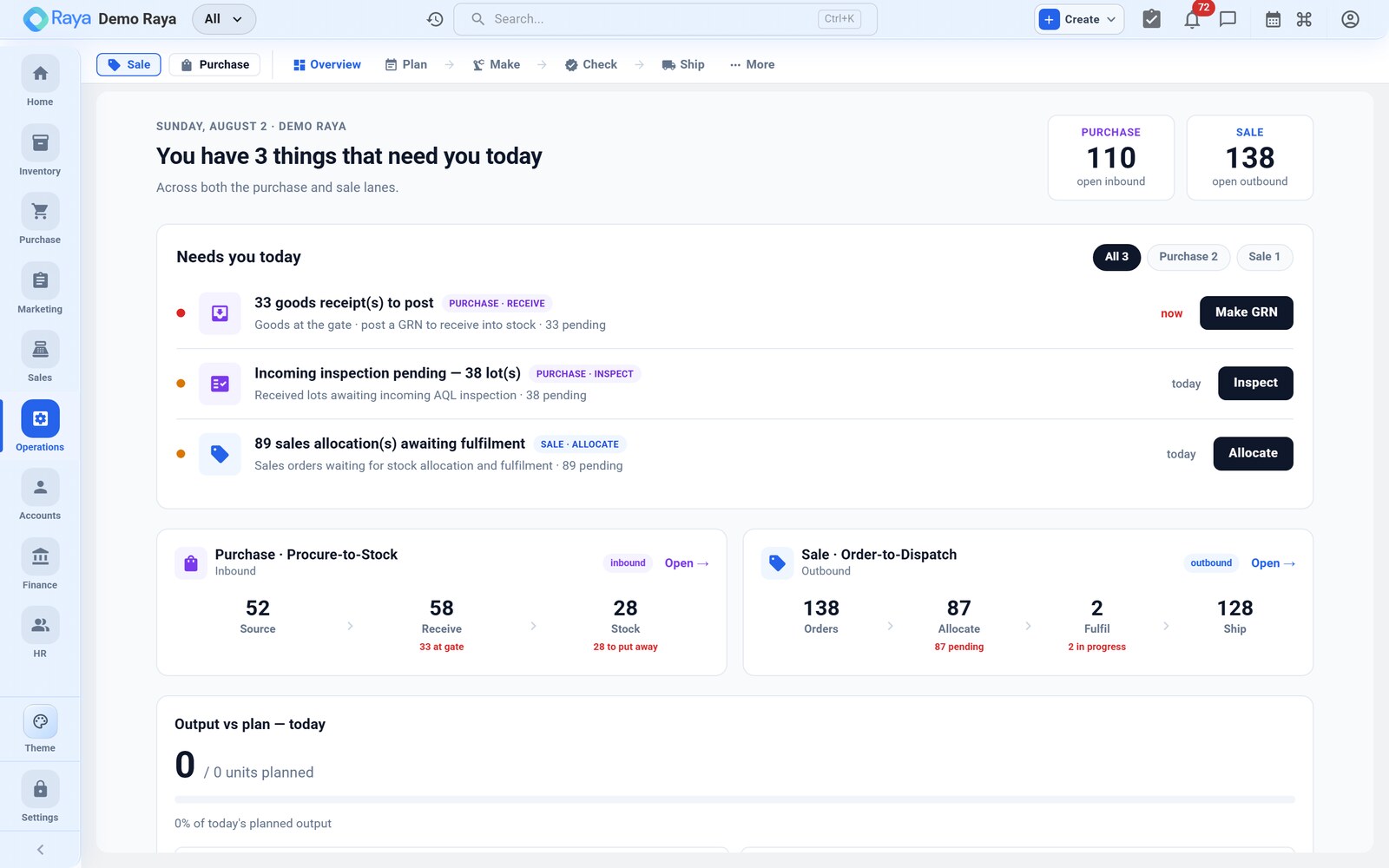
The worked example used across this module
Every page in this module follows the same job, so the numbers join up from allocation to dispatch:
| Fact | Value |
|---|---|
| Sales order | SO-1290 — 2,000 × "50 L HDPE Drum" (Finished Goods, HSN 3923, GST 18%) |
| BOM (per drum) | HDPE Granules Grade A 2.4 kg, Masterbatch Blue 40 g, Lid + gasket set 1 |
| Routing | extrusion → blow moulding → trimming → packing |
| Blended scrap | ≈ 1.2% |
| Standard cost | ₹214 / drum → work order value ₹4,28,000 |
Keep this box in mind — the work order explodes the BOM against it, QC inspects the output, packaging boxes it, and logistics ships it and posts the Sales/COGS vouchers.
The fulfilment path
Most work follows one path, no matter the industry:
Allocate → Work Order → Quality Control → Pack → Dispatch
- Allocate — for each sales order line, decide how it will be fulfilled: pick from stock, produce it, procure it, or transfer it in.
- Work Order — a line marked Produce (or Transfer) generates a work order, which draws material and drives the shop floor.
- Quality Control — output is inspected; good stock passes, defects are held or sent for rework.
- Pack — finished goods are packed into customer-ready packaging, consuming packaging materials.
- Dispatch — a delivery order ships the goods; completing it moves the sales order to Shipped and posts the accounts.
Each step links back to the order that triggered it, so you can always trace why a work order, purchase order, or delivery exists.
End-to-end walkthrough of SO-1290
1. Allocate the line
The drum is a Finished Goods item with a BOM and no free stock, so on Operations → Stock Allocation the planner allocates the 2,000-unit line as Produce. Raya reserves nothing from finished-goods stock (there is none) and spawns a manufacturing work order for 2,000 drums, linked back to SO-1290.
2. Raise and release the work order
WO-2418 loads the BOM × 2,000 (plus the 1.2% scrap allowance) and the four-step routing. Releasing it reserves the raw materials in stores and — under Advanced Manufacturing — generates one job card per routing step.
| Component | Per drum | × 2,000 (incl. scrap) | Rate | Reserved value |
|---|---|---|---|---|
| HDPE Granules Grade A | 2.4 kg | 4,857.6 kg | ₹80/kg | ₹3,88,608 |
| Masterbatch Blue | 40 g | 80.96 kg | ₹250/kg | ₹20,240 |
| Lid + gasket set | 1 | 2,024 | ₹6 | ₹12,144 |
| Total material | ₹4,20,992 |
3. Produce
Operators clear job cards stage by stage. Going In Progress deducts the raw materials (a Manufacturing Consumption stock move); Completed adds the drums to finished-goods stock (a Manufacturing Output move) and scrap posts as an Adjustment Decrease. Add conversion of ₹3.50/drum (₹7,000) and the batch rolls up at ≈ ₹214/drum.
4. Quality Control
The 2,000 finished drums go to QC. 1,976 pass (first-pass yield 98.8%), 16 go to rework for flash, 8 fail on short-shots and are quarantined. Passed units are released to available stock.
5. Pack
A packaging order shrink-wraps the drums onto pallets, consuming stretch film and pallets, and records package weight and dimensions for the carrier.
6. Dispatch
A delivery order ships the pallets. Marking it Delivered moves SO-1290 to Shipped and Finance posts the Sales voucher (₹6,40,000 + 18% GST) and the COGS voucher (₹4,28,000 out of finished-goods stock).
Standard vs Advanced
Operations runs in two tiers. Advanced Manufacturing is switched on per tenant in Settings → Feature flags.
| Capability | Standard | Advanced |
|---|---|---|
| Stock allocation (Pick / Produce / Procure / Transfer) | ✔ | ✔ |
| Single-level work orders with BOM & routing | ✔ | ✔ |
| Quality control, packaging, delivery | ✔ | ✔ |
| Multi-level work-order trees & job cards | ✔ | |
| MRP netting and the planning board | ✔ | |
| Subcontracting (send-out / receive-back) | ✔ |
If a sub-tab described here is missing, Advanced Manufacturing is off. Ask an admin to enable it in Settings → Feature flags. On the Standard tier you still get the full Allocate → Produce → QC → Pack → Dispatch path — just single-level and without the planning board.
Sub-pages
| Sub-tab | What it's for |
|---|---|
| Overview | Operations KPIs and quick links |
| Stock Allocation | Choose how to fulfil each order line |
| Work Orders, BOM & Routing | Manufacturing and transfer instructions |
| Quality Control | Inspections, pass/fail, non-conformance |
| Packaging | Pack finished goods with material tracking |
| Logistics & Delivery | Delivery orders and dispatch |
| MRP & Planning | Netting demand vs supply (Advanced) |
| Subcontracting | Outsourced processing (Advanced) |
Related
- Make-to-Order workflow — the end-to-end manufacturing cycle.
- Inventory — stock, BOMs and locations that Operations draws on.
- Finance — where completed production and dispatch post their vouchers.