Working with Items
Inventory → Items is the item master. Everything you sell, buy or make is a product here, and every field you set on an item quietly drives behaviour elsewhere — whether it can be batch-picked, when a low-stock alert fires, what GST rate lands on an invoice, and how work orders consume it. This page walks the whole create-an-item form, field group by field group, using two items we carry through the rest of the Inventory docs.
Our two worked examples
| HDPE Granules — Grade A | 50 L HDPE Drum | |
|---|---|---|
| Item type | Raw Material | Finished Goods |
| What it is | The polymer we blend and blow-mould | The drum we make and sell |
| HSN | 3901 (polymers of ethylene) | 3923 (plastic packing articles) |
| Tracking | Batch-tracked (lot + supplier) | Serial-tracked (returnable drums) |
| Stock UoM | MT (with Kg / Bag alternates) | Piece (Nos) |
| Reorder point | 40 MT | 500 pcs |
Stock for both is held across two locations — Vatva WH-1 and Odhav Depot.
Find items fast
-
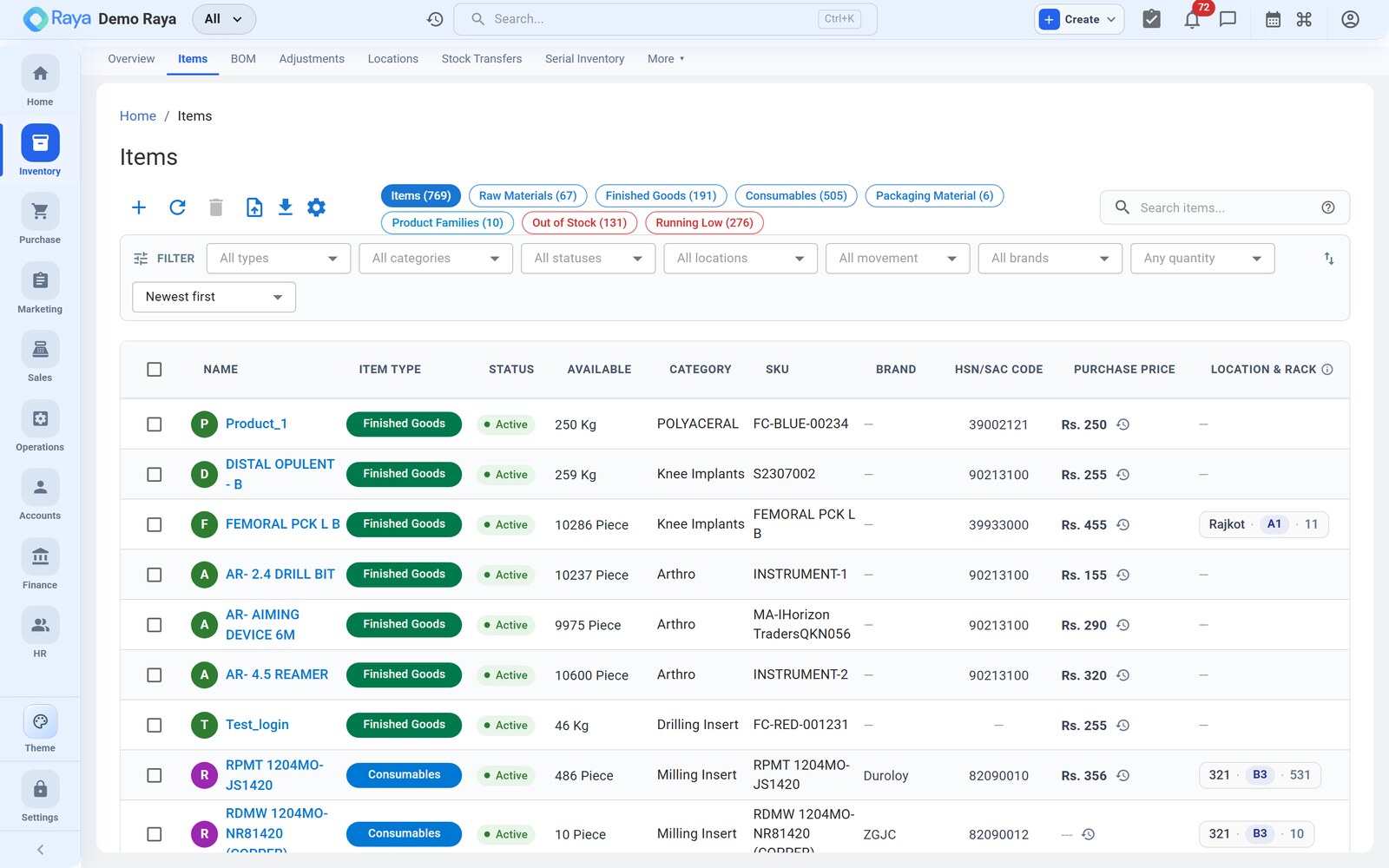
KPI chips across the top (Items, Raw Materials, Finished Goods, Consumables, Packaging Material, Out of Stock, Running Low…) act as one-click filters — click Running Low to see everything at or below its reorder point.
-
Filter bar — narrow by type, category, status, location, movement (slow/non-moving), brand and quantity.
-
Search operators — the search box understands prefixes and operators so you can be precise:
Type this To find sku:RM-HDPE-GRAan exact SKU hsn:3901items with that HSN code cat:Polymersa category brand:Reliancea brand type:rawby product type rack:B3items in a rack drum -label"drum" but not "label" (exclude with -)hdpe OR ldpeeither term RM-%wildcards ( %or*)
The field groups
A new item form is organised into groups. Only the first is mandatory; the rest refine how the item behaves.
| Group | Sets | Required? |
|---|---|---|
| Basic information | Type, name, SKU, HSN/SAC, brand, category, image | Type, name, SKU |
| Units & pricing | Base UoM, alternate UoM, selling/purchase rate, tax rate | Base UoM |
| Inventory tracking | Track stock, reorder level, batch/serial toggles | — |
| Manufacturing (Finished Goods only) | Bill of Materials, routing | — |
| Opening stock | Starting quantity per location | — |
Worked example — create "HDPE Granules — Grade A"
Click + (top-left of the list) or go to Items → New Item, then fill each group.
1. Basic information
- Set Item Type to Raw Material. This tells Raya the item tracks stock and can appear as a BOM component, but never carries a BOM of its own.
- Enter the Product Name
HDPE Granules — Grade A. - Leave SKU blank to auto-generate, or type your own — we use
RM-HDPE-GRA. The SKU is what barcodes, CSV imports and integrations key on, so keep it stable. - Enter the HSN code
3901and set the Tax Rate to 18% — these flow onto every purchase and sales document for this item. - Optionally add a Brand, a Category (e.g.
Polymers ▸ HDPE) and a product image.
:::caution One item, one SKU
The most common data-entry mistake is creating the same material twice under slightly
different SKUs (RM-HDPE-GRA and RM-HDPEA). Always search first — a duplicate splits
your stock and your valuation across two records.
:::
2. Units & pricing — base and alternate UoM
Granules are received by the tonne but consumed by the kilogram, so we define a base unit and alternate units that convert to it.
-
Set the base Unit of Measure to MT (metric tonne) — this is the unit stock is held and valued in.
-
Add alternate units with their conversion factor to the base:
Alternate UoM Conversion Used for Kg 1 MT = 1,000 Kg BOM consumption, small issues Bag 1 Bag = 25 Kg (0.025 MT) Supplier packing on POs -
Enter the Purchase Rate
₹95,000 / MT(the default cost that pre-fills on a PO) and, if you resell, a Selling Rate.
:::tip Buy in one unit, build in another
Because Kg is defined as an alternate of MT, you can raise a PO for 40 Bags or 1 MT
and still have a BOM consume 2.2 Kg per drum — Raya converts everything back to the MT
base for the stock ledger and valuation.
:::
3. Inventory tracking — reorder point and batch toggle
- Leave Track Stock? on (it is, for a Raw Material).
- Set the Reorder Level to 40 MT. When free-to-promise stock across the item drops to 40 MT, the item joins the Running Low KPI chip and a low-stock alert fires.
- Turn Batch Tracking on. From now on, every receipt of this item must carry a batch (lot) number, and optionally a manufacture date and expiry date; issues draw from batches oldest-first (FIFO).
| Toggle | When on | Effect |
|---|---|---|
| Batch Tracking | Grouped identical units (lots, chemicals, food) | Each GRN opens a batch with number, mfg/expiry, per-batch cost |
| Serial Tracking | Individually identifiable units | Each unit gets its own serial number and custody trail |
:::caution Turn tracking on before the first receipt Batch and serial toggles should be set before you take any stock in. Switching them on for an item that already has plain on-hand stock leaves that opening quantity un-batched and hard to allocate. :::
4. Opening stock per location
If you are onboarding with existing stock, seed it here so day-one balances are right.
- In Opening Stock, add a row per location: Vatva WH-1 — 55 MT (batch
HD-2405-A) and Odhav Depot — 12 MT (batchHD-2404-B). - Enter the opening rate so the value is set — e.g. ₹95,000/MT. This posts an Opening Balance entry to the stock ledger, not a purchase.
5. Save
Click Save. The item is now selectable on sales orders, purchase orders, BOMs, transfers and adjustments, and appears under the Raw Materials KPI chip.
The finished good — "50 L HDPE Drum"
Create the drum the same way, with these differences:
- Item Type = Finished Goods. This unlocks the Manufacturing group, where you attach its Bill of Materials — the recipe that lists HDPE Granules and the other components per drum.
- Base UoM = Piece (Nos), HSN 3923, tax 18%, Reorder Level 500 pcs.
- We sell these as returnable drums, so turn Serial Tracking on — each drum gets a unique serial captured at receipt and followed through delivery and return. See Serial Inventory.
:::note Type drives behaviour Services don't track stock at all; Raw Material, Consumables and Packaging Material can be BOM components; only Finished Goods carry a BOM and routing. Pick the type deliberately — it is awkward to change once transactions exist. :::
Free-text items
You can also type a one-off product name directly on an order without adding it to the catalog — handy for rare, non-stocked lines. Free-text lines don't affect stock.
Import & export
- Import — the Import Wizard (the up-arrow icon) bulk-loads products from a CSV, mapping your columns to Raya fields. Run it on a small 5–10 row subset first to catch column-mapping mistakes before loading thousands of rows.
- Export — the download icon exports the current (filtered) list.
Related
- Bill of Materials — the drum's recipe built from these items.
- Serial Inventory — per-unit tracking on the drum.
- Adjustments — correct stock with a reason code.
- Stock Transfers — move stock between locations.
- Costing & Reports — how cost and valuation work.